


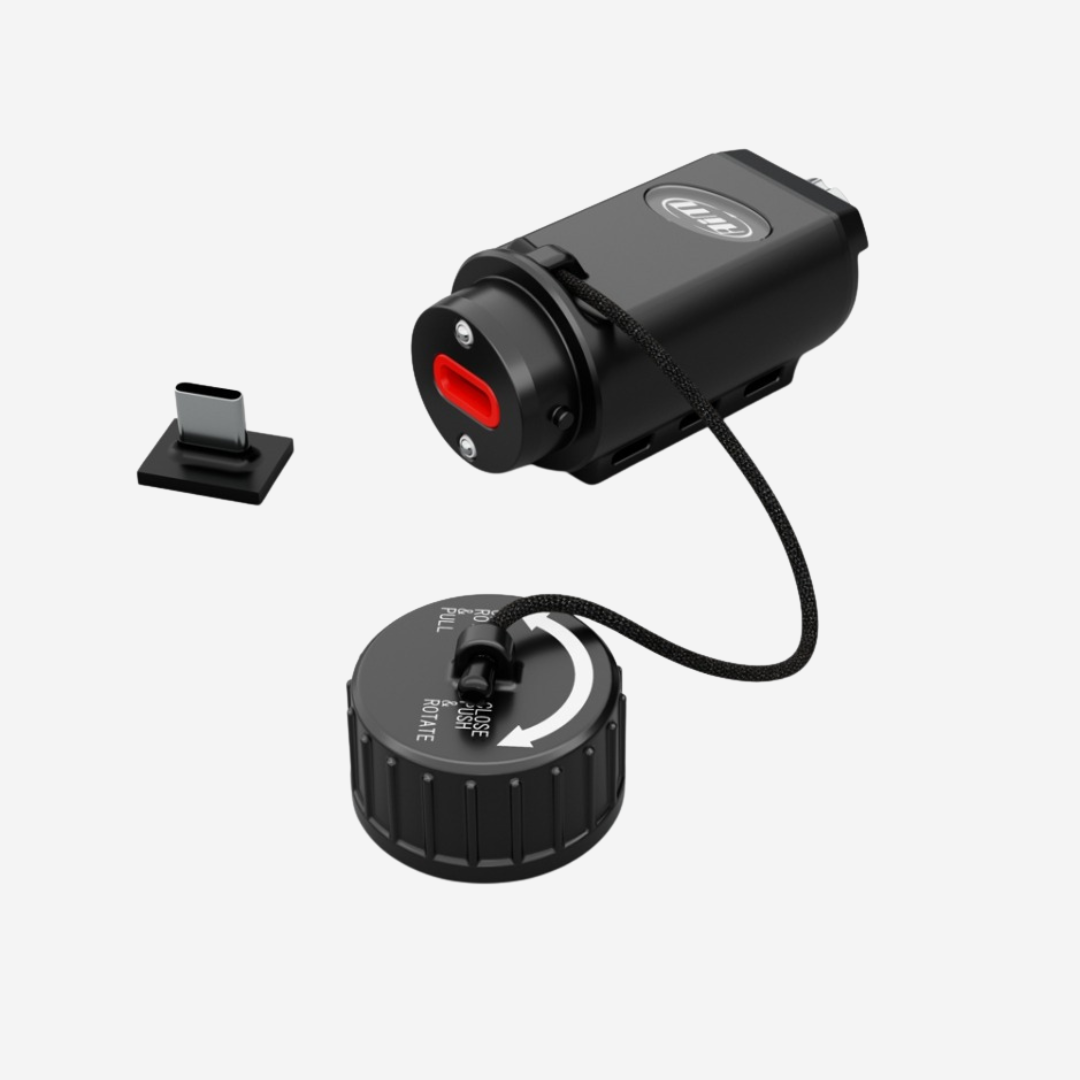

Aim CANKey CAN Bus Data Logger, Sniffer & Streamer
Pairs well with

Same Day Shipping
When you order before 15:00 BST
Monday - Friday

Worldwide Shipping


All Orders are Carbon-Neutral


Aim CANKey CAN Bus Data Logger, Sniffer & Streamer
If you’ve got a question, you’re looking for information, or you just want to chat, please find a host of available help options below.
Record, Analyse and Replay CAN Bus Data
The Aim CANKey is a compact, multifunctional CAN bus device offering professional data recording, ECU monitoring, CAN traffic replay and additional storage for compatible Aim loggers. Featuring four operating modes, Race Studio 3 integration and expandable memory, it provides a versatile solution for motorsport data acquisition, diagnostics and vehicle electronics development.
Why Choose the CANKey
The Aim CANKey is a compact, versatile CAN bus data acquisition device designed for motorsport engineers, vehicle developers and racing teams. Offering four operating modes in a single unit, CANKey allows users to record CAN bus traffic, replay captured data, acquire information directly from an ECU or extend the recording memory of a compatible Aim data logger.
Whether you're analysing vehicle communications, diagnosing ECU signals, developing electronic systems or reviewing performance data, CANKey provides a flexible solution for capturing and managing information from your vehicle's CAN network.
Configured through Aim Race Studio 3, CANKey records data to its 4GB internal memory, with additional recording to a removable USB memory drive when connected. Its compact aluminium construction, IP67 waterproof rating and lightweight design make it suitable for demanding motorsport environments.
CAN Sniffer: Capture CAN Bus Traffic
CAN Sniffer mode records every CAN frame travelling across the connected bus, complete with microsecond-resolution timestamps.
This allows engineers to investigate the information transmitted by an ECU or vehicle electronics without needing to interpret the messages during recording.
Recordings can be exported in CSV or ASAM MDF4 formats for analysis in compatible third-party software, alongside Aim's native recording format.
CANKey also offers a silent monitoring option, allowing CAN traffic to be observed without acknowledging or transmitting frames onto the bus.
CAN Streamer: Replay Recorded Data
CAN Streamer mode allows previously recorded CAN bus traffic to be transmitted back onto a CAN network while preserving its original timing.
This is particularly useful for bench testing, electronics development and troubleshooting, allowing engineers to recreate recorded vehicle communications without requiring the original vehicle to be present.
Recordings can be played once or continuously in a loop, providing flexibility for testing and development.
ECU Logger: Record Engine Data
In ECU Logger mode, CANKey communicates with an ECU using a supported Aim ECU protocol, recording selected channels for subsequent analysis.
Up to 120 ECU channels can be enabled, depending on the selected protocol, allowing users to capture a wide range of available engine and vehicle information.
Recorded sessions can be downloaded and analysed using Race Studio 3, providing familiar data analysis tools for existing Aim users.
Memory Module: Expand Your Aim Logger
CANKey can also operate as an additional recording memory module for compatible Aim data loggers.
When connected to the logger's Aim CAN network, CANKey automatically receives the master logger's configuration and records the selected channels whenever the master begins recording.
Files are saved using matching session names, making it easier to identify and manage recordings across both devices.
Compact, Durable Design
Built around a lightweight aluminium housing, CANKey is designed to withstand demanding motorsport and automotive environments.
Weighing approximately 50g and featuring IP67-rated protection, the compact device can be installed using screws, straps or Velcro.
An optional automatic switch-off function can also help reduce power consumption when the CAN bus is inactive, with configurable CAN activity wake-up functionality.
Race Studio 3 Integration
CANKey is fully configurable through Aim Race Studio 3, allowing users to select operating modes, manage recording conditions, monitor CAN traffic, download sessions and update device firmware.
The software provides live CAN message monitoring in Sniffer mode and live ECU channel values in ECU Logger mode.
With automatic baud-rate detection available in Sniffer mode, CANKey can identify the connected CAN network's communication speed, simplifying the configuration process.
Expand Your System
Get more from your Aim CANKey with a range of compatible connection and storage accessories. Choose from CAN connection cables, dedicated ECU wiring and removable USB memory to create a setup suited to your vehicle, recording requirements and data analysis needs.
Technical Information
Technical Specs
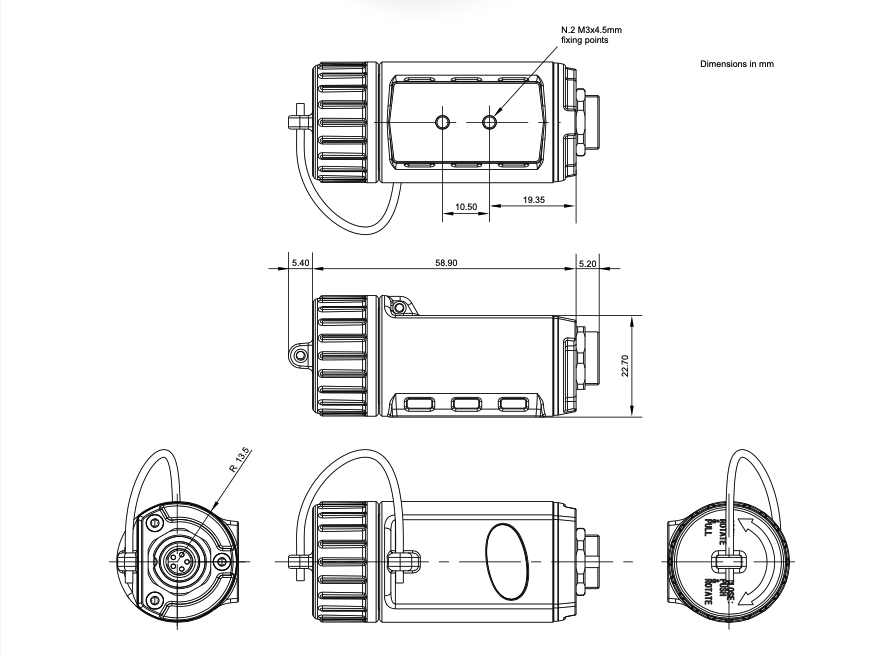
Diagram
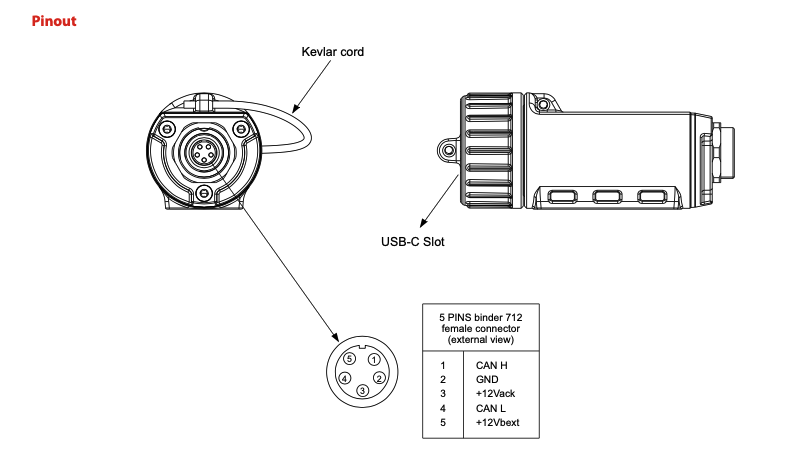
Pinout
Included in the Box
CAN Key
-

Free Aim Software
Downloads


Videos
Installation

Connection Example
FAQs
Please read our FAQs page to find out more.
How do you upgrade the Suzuki GSX-R1000 Dash?
To upgrade your Suzuki GSX-R Dash, you can install the MXPS Dash Logger, which replaces the OEM unit on the GSX-R1000 and GSX-R1000R models. Installation is quick and easy thanks to the plug & play connectivity - simply fit the device into the OEM bracket and connect to the motorcycle's existing connectors. For a more in-depth tutorial, take a look at our MXPS Suzuki GSX-R installation in the "Videos" tab.
What are the key features of the Aim MXPS Suzuki GSX-R1000 Dash Logger?
The Aim MXPS Suzuki GSX-R1000 Plug & Play Dash Logger is a high-performance piece of motorsport equipment that offers an advanced and upgraded data logging experience, whilst having a range of additional features that make it easier to expand your system.
The MXPS Dash Logger has delta times shown, letting you compare your current lap with others to see exactly where you are gaining or losing seconds. It has customisable LEDs as well as a high contrast TFT display for optimised personalisation and ease in seeing your data in any condition.
The GPS module is also very accurate to 25Hz, allowing for advanced tracking capabilities and data collection. Ultimately, data collection is upgraded massively with the MXPS Dash Logger, with multiple motorcycle parameters being monitored and recorded for performance analysis.
Does the Aim MXPS Dash Logger work with other Aim products?
The Aim MXPS Dash Logger is designed to work with various other Aim products, acting as a central hub for data acquisition on the Suzuki GSX-R. It features an expansion port (via CAN connection) that allows for easy integration of additional sensors and systems to enhance performance monitoring. Please see the "Connections" tab for examples.